Showing posts with label C. Show all posts

Pointer (interdiction)

                                   One of those things beginners in C find difficult is the concept of pointers. If you want have a clear idea about  c pointers first of all you need to have clear idea about  C variables. Thus we start with a discussion of C variables.
techaravind  c pointers


                                   A variable in a program is something with a name, the value of which can vary. The way the compiler and linker handles this is that it assigns a specific block of memory within the computer to hold the value of that variable. The size of that block depends on the range over which the variable is allowed to vary. For example, on 32 bit PC's the size of an integer variable is 4 bytes. On older 16 bit PCs integers were 2 bytes.  In C the size of a variable type such as an integer need not be the same on all types of machines.  Further more there is more than one type of integer variable in C.  We have integers, long integers and short integers which you can read up on in any basic text on C.  Here we assumes the use of a 32 bit system with 4 byte integers.


If you want to know the size of the various types of integers on your system, running the following code will give you that information.


#include <stdio.h>


int main()

{

printf("size of a short is %d\n", sizeof(short));

printf("size of a int is %d\n", sizeof(int));

printf("size of a long is %d\n", sizeof(long));

}


When we declare a variable we inform the compiler of two things, the name of the variable and the type of the variable. For example, we declare a variable of type integer with the name k by writing:


    int k;


On seeing the "int" part of this statement the compiler sets aside 4 bytes of memory (on a PC) to hold the value of the integer. It also sets up a symbol table. In that table it adds the symbol k and the relative address in memory where those 4 bytes were set aside.


Thus, later if we write:


    k = 2;


we expect that, at run time when this statement is executed, the value 2 will be placed in that memory location reserved for the storage of the value of k. In C we refer to a variable such as the integer k as an "object".


In a sense there are two "values" associated with the object k. One is the value of the integer stored there (2 in the above example) and the other the "value" of the memory location, i.e., the address of k. Some texts refer to these two values with the nomenclature rvalue (right value, pronounced "are value") and lvalue (left value, pronounced "el value") respectively.


In some languages, the lvalue is the value permitted on the left side of the assignment operator '=' (i.e. the address where the result of evaluation of the right side ends up). The rvalue is that which is on the right side of the assignment statement, the 2 above. Rvalues cannot be used on the left side of the assignment statement. Thus: 2 = k; is illegal.


Actually, the above definition of "lvalue" is somewhat modified for C. According to K&R II (page 197): [1]


    "An object is a named region of storage; an lvalue is an expression referring to an object."


However, at this point, the definition originally cited above is sufficient. As we become more familiar with pointers we will go into more detail on this.


Okay, now consider:


   int j, k;


    k = 2;

    j = 7;    <-- line 1

    k = j;    <-- line 2


In the above, the compiler interprets the j in line 1 as the address of the variable j (its lvalue) and creates code to copy the value 7 to that address. In line 2, however, the j is interpreted as its rvalue (since it is on the right hand side of the assignment operator '='). That is, here the j refers to the value stored at the memory location set aside for j, in this case 7. So, the 7 is copied to the address designated by the lvalue of k.


In all of these examples, we are using 4 byte integers so all copying of rvalues from one storage location to the other is done by copying 4 bytes. Had we been using two byte integers, we would be copying 2 bytes.


Now, let's say that we have a reason for wanting a variable designed to hold an lvalue (an address). The size required to hold such a value depends on the system. On older desk top computers with 64K of memory total, the address of any point in memory can be contained in 2 bytes. Computers with more memory would require more bytes to hold an address.  The actual size required is not too important so long as we have a way of informing the compiler that what we want to store is an address.


Such a variable is called a pointer variable (for reasons which hopefully will become clearer a little later). In C when we define a pointer variable we do so by preceding its name with an asterisk. In C we also give our pointer a type which, in this case, refers to the type of data stored at the address we will be storing in our pointer. For example, consider the variable declaration:


   int *ptr;


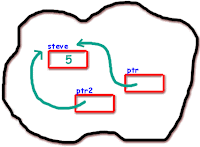
ptr is the name of our variable (just as k was the name of our integer variable). The '*' informs the compiler that we want a pointer variable, i.e. to set aside however many bytes is required to store an address in memory. The int says that we intend to use our pointer variable to store the address of an integer. Such a pointer is said to "point to" an integer. However, note that when we wrote int k; we did not give k a value. If this definition is made outside of any function ANSI compliant compilers will initialize it to zero. Similarly, ptr has no value, that is we haven't stored an address in it in the above declaration. In this case, again if the declaration is outside of any function, it is initialized to a value guaranteed in such a way that it is guaranteed to not point to any C object or function. A pointer initialized in this manner is called a "null" pointer.


The actual bit pattern used for a null pointer may or may not evaluate to zero since it depends on the specific system on which the code is developed. To make the source code compatible between various compilers on various systems, a macro is used to represent a null pointer. That macro goes under the name NULL. Thus, setting the value of a pointer using the NULL macro, as with an assignment statement such as ptr = NULL, guarantees that the pointer has become a null pointer. Similarly, just as one can test for an integer value of zero, as in if(k == 0), we can test for a null pointer using if (ptr == NULL).


But, back to using our new variable ptr. Suppose now that we want to store in ptr the address of our integer variable k. To do this we use the unary & operator and write:


    ptr = &k;


What the & operator does is retrieve the lvalue (address) of k, even though k is on the right hand side of the assignment operator '=', and copies that to the contents of our pointer ptr. Now, ptr is said to "point to" k. Bear with us now, there is only one more operator we need to discuss.


The "dereferencing operator" is the asterisk and it is used as follows:


    *ptr = 7;


will copy 7 to the address pointed to by ptr. Thus if ptr "points to" (contains the address of) k, the above statement will set the value of k to 7. That is, when we use the '*' this way we are referring to the value of that which ptr is pointing to, not the value of the pointer itself.


Similarly, we could write:


 printf("%d\n",*ptr);


to print to the screen the integer value stored at the address pointed to by ptr;.


One way to see how all this stuff fits together would be to run the following program and then review the code and the output carefully.


------------ Program 1.1 ---------------------------------


/* Program 1.1 from PTRTUT10.TXT   6/10/97 */


#include <stdio.h>


int j, k;

int *ptr;


int main(void)

{

    j = 1;

    k = 2;

    ptr = &k;

    printf("\n");

    printf("j has the value %d and is stored at %p\n", j, (void *)&j);

    printf("k has the value %d and is stored at %p\n", k, (void *)&k);

    printf("ptr has the value %p and is stored at %p\n", ptr, (void *)&ptr);

    printf("The value of the integer pointed to by ptr is %d\n", *ptr);


    return 0;

}


Note: We have yet to discuss those aspects of C which require the use of the (void *) expression used here. For now, include it in your test code. We'll explain the reason behind this expression later.

Student Record-File Management Program in C

c-techaravind-student-record-img
                                              To compile and execute the program, copy the code into a text file. Save the text file with the extinction .c (ex. program.c). Save your file in turboc2 or borland (it may your othe c-compiler). Now open you IDE (tc.exe) , goto file->pick file. Your source file will be loaded into IDE. Now you can compile and run the file easily.

C program for append,list,search ,modify,delete a student record in a File.


#include<stdio.h>
#include<conio.h>
void append();
void list();
void search();
void modify();
void del();

struct student
{
int no;
char name[20];
};

void main()
{
int a;
char ch;
clrscr();
do{
printf("\nstudent DATABASE\n\n");
printf("1.Append student Record\n2.List student Record\n3.Modify student Record\n4.Delete student Record\n5.Search student Record\n Enter Choice : ");
scanf("%d",&a);
switch(a)
{
case 1:
append();
break;
case 2:
list();
break;
case 3:
modify();
break;
case 4:
del();
break;
case 5:
search();
break;
default :
printf("Invalid Choice!");
}
printf("\n More Actions ? (Y/N) :");
fflush(stdin);
scanf("%c", &ch);
}while(ch=='y'|| ch=='Y');
}

void append()
{
int i,n;
struct student e;
FILE *fp;
fp=fopen("student.dat", "a");
if(fp==NULL)
{
printf("File Creation Failed!");
exit(0);
}
printf("Enter the nos. of students : ");
scanf("%d", &n);
for(i=0;i<n;i++)
{
printf("Enter the student Number : ");
scanf("%d", &e.no);
printf("Enter the student Name : ");
fflush(stdin);
gets(e.name);
printf("\n\n");
fwrite((char *)&e, sizeof(e), 1, fp);
}
fclose(fp);
}

void list()
{
int nofrec=0;
struct student e;
FILE *fp;
fp=fopen("student.dat", "rb");
if(fp==NULL)
{
printf("\n\tFile doesn’t exist!!!\TRY AGAIN");
exit(0);
}
while((fread((char *)&e, sizeof(e), 1, fp))==1)
{
nofrec++;
printf("\nstudent Number : %d", e.no);
printf("\nstudent Name : %s",e.name);
printf("\n\n");
}
printf("Total number of records present are : %d", nofrec);
fclose(fp);
}

void modify()
{
int recno, nofrec=0;
char ch;
struct student e;
FILE *fp;
fp=fopen("student.dat", "rb+");
printf("Enter the student Number to modify : ");
scanf("%d", &recno);
while((fread((char *)&e, sizeof(e), 1, fp))==1)
{
nofrec++;
if(e.no==recno)
{
printf("\nstudent Number : %d", e.no);
printf("\nstudent Name : %s",e.name);
printf("\n");
printf("Do you want to modify this record : ? (Y/N)");
fflush(stdin);
scanf("%c", &ch);
fseek(fp, ((nofrec-1)*sizeof(e)), 0);
if(ch=='Y'|| ch=='y')
{
printf("Enter the student No : ");
scanf("%d",&e.no);
printf("Enter the student Name : ");
fflush(stdin);
gets(e.name);
fwrite((char *)&e, sizeof(e), 1, fp);
printf("Record Modified");
}
else
printf("No modifications were made");
fclose(fp);
}
}
}
void del()
{
int recno;
char ch;
struct student e;
FILE *fp, *ft;
fp=fopen("student.dat", "rb");
ft=fopen("Temp.dat", "wb");
printf("Enter the student Number to delete : ");
scanf("%d", &recno);
while((fread((char *)&e, sizeof(e), 1, fp))==1)
{
if(e.no==recno)
{
printf("\nstudent Number : %d", e.no);
printf("\nstudent Name : %s",e.name);
printf("\n");
printf("Do you want to delete this record : ? (Y/N)");
fflush(stdin);
scanf("%c", &ch);
}
}
if(ch=='y'||ch=='Y')
{
rewind(fp);
while((fread((char *)&e, sizeof(e), 1, fp))==1)
{
if(recno!=e.no)
{
fwrite((char *)&e, sizeof(e), 1, ft);
}
}
}
else
printf("No Record was deleted");
fclose(fp);
fclose(ft);
remove("student.dat");
rename("Temp.dat", "student.dat");
}


void search()
{
int s,recno;
char sname[20];
struct student e;
FILE *fp;
fp=fopen("student.dat", "rb");
printf("\n1.Search by Name\n2.Search by student No.\n Enter choice : ");
scanf("%d", &s);
switch(s)
{
case 1:
printf("Enter the student Name to Search : ");
fflush(stdin);
gets(sname);
while((fread((char *)&e, sizeof(e), 1, fp))==1)
{
if(strcmp(sname,e.name)==0)
{
printf("\nstudent Number : %d", e.no);
printf("\nstudent Name : %s",e.name);
printf("\n");
}
}
break;
case 2:
printf("Enter the student Number to Search : ");
scanf("%d", &recno);
while((fread((char *)&e, sizeof(e), 1, fp))==1)
{
if(e.no==recno)
{
printf("\nstudent Number : %d", e.no);
printf("\nstudent Name : %s",e.name);
printf("\n");
}
}
break;
}
}


Roots of a given quadratic equation in C

c-techaravind


                                              To compile and execute the program, copy the code into a text file. Save the text file with the extinction .c (ex. program.c). Save your file in turboc2 or borland (it may your othe c-compiler). Now open you IDE (tc.exe) , goto file->pick file. Your source file will be loaded into IDE. Now you can compile and run the file easily.


#include<stdio.h>
#include<math.h>
void main()
{
int A, B, C;
float disc, x1, x2;
clrscr();
gotoxy(31,1);
printf("Root of a quadratic equation");
gotoxy(26,3);
printf("http:\\techaravind.blogsopt.com");
gotoxy(1,5);

printf("\n\n\t ENTER THE VALUES OF A,B,C...");
scanf("%d,%d,%d", &A, &B, &C);
disc=(B * B) - (4 * A * C);
if(disc > 0)
{
printf("\n\t THE ROOTS ARE REAL ROOTS");
x1 = (-B/2 * A) + (sqrt((B * B) - (4 * A * C)) /2 * A);
x2 = (-B/2 * A) - (sqrt((B * B) - (4 * A * C)) / 2 * A);
printf("\n\n\t THE ROOTS ARE...: %f and %f\n", x1, x2);
}
else if(disc == 0)
{
printf("\n\t THE ROOTS ARE REPEATED ROOTS");
x1 = -B/2 * A;
printf("\n\n\t THE ROOT IS...: %f\n", x1);
}
else
printf("\n\t THE ROOTS ARE IMAGINARY ROOTS\n");
getch();
}

Print the series upto 'n' terms: 1 4 27 256.......

c-techaravind


                                              To compile and execute the program, copy the code into a text file. Save the text file with the extinction .c (ex. program.c). Save your file in turboc2 or borland (it may your othe c-compiler). Now open you IDE (tc.exe) , goto file->pick file. Your source file will be loaded into IDE. Now you can compile and run the file easily.


#include<stdio.h>
#include<conio.h>
#include<math.h>
void main()
{
int n,i,p;
clrscr();
gotoxy(31,1);
printf("1-4-27 series");
gotoxy(26,3);
printf("http:\\techaravind.blogsopt.com");
gotoxy(1,5);
printf("Enter no. of elements:");
scanf("%d",&n);
for(i=1;i<=n;i++)
{
p=pow(i,i);
printf("%d",p);
printf(" ");

}
getch();
}

Program to print digits triangle in C

c-techaravind


                                              To compile and execute the program, copy the code into a text file. Save the text file with the extinction .c (ex. program.c). Save your file in turboc2 or borland (it may your othe c-compiler). Now open you IDE (tc.exe) , goto file->pick file. Your source file will be loaded into IDE. Now you can compile and run the file easily.


#include<stdio.h>
#include<conio.h>
void main()
{
int p,q,m,n;
clrscr();
gotoxy(31,1);
printf("Digits triangle");
gotoxy(26,3);
printf("www.techaravind.blogspot.com");
gotoxy(1,5);
printf("Enter no.of lines:");
scanf("%d",&n);
 for(p=1;p<=n+1;p++)
{
 for(q=1;q<=n+1-p;q++)
 printf(" ");
m=1;
for(q=1;q<p;q++)
printf("%d",m++);
m=m-1;
for(q=2;q<p;q++)
printf("%d",--m);
printf("\n");
}
     getch();
}

Swaping to two numbers in c

c-techaravind


                                              To compile and execute the program, copy the code into a text file. Save the text file with the extinction .c (ex. program.c). Save your file in turboc2 or borland (it may your othe c-compiler). Now open you IDE (tc.exe) , goto file->pick file. Your source file will be loaded into IDE. Now you can compile and run the file easily.


Swaping of two numbers:

swaping means changing the content of A memory location to B and vice versa. In programing we use a 3rd temporary to change the content.


#include <stdio.h>
#include <conio.h>
main()
{
int a, b, temp;
clrscr();
gotoxy(31,1);
printf("Swaping Of Two Numbers");
gotoxy(26,3);
printf("http:\\techaravind.blogsopt.com");
gotoxy(1,5);
printf("\nEnter any two numbers: ");
scanf("%d %d", &a, &b);
printf("\n\nBefore Swapping:\n");
printf("\na = %d\n", a);
printf("\nb = %d\n", b);
temp = a;
a = b;
b = temp;
printf("\n\nAfter Swapping:\n");
printf("\na = %d\n", a);
printf("\nb = %d\n", b);
getch();
}

Find the nth Fibonacci c series in c


                                              To compile and execute the program, copy the code into a text file. Save the text file with the extinction .c (ex. program.c). Save your file in turboc2 or borland (it may your othe c-compiler). Now open you IDE (tc.exe) , goto file->pick file. Your source file will be loaded into IDE. Now you can compile and run the file easily.


Fibonacci series: Fibonacci series is  series obtained by adding a number with its previous number.


#include<conio.h>
#include<stdio.h>
void main()
{
int f1 = 0, f2 = 1, f3, n;
clrscr();
gotoxy(31,1);
printf("fibbonic series");
gotoxy(26,3);
printf("http:\\techaravind.blogsopt.com");
gotoxy(1,5);
printf("Program for Fibonacci Series\n");
printf("Enter the maximum number for Fibonacci Series: ");
scanf("%d", &n);
printf("\nPrinting Fibonacci Series from 0 - %d\n", n);
printf("%d\n%d\n", f1, f2);
while(1)
{
f3 = f1 + f2;
if(f3 > n)
break;
printf("%d\n", f3);
f1 = f2;
f2 = f3;

}
getch();
}


Menu driven program for simple string operation in c


                                              To compile and execute the program, copy the code into a text file. Save the text file with the extinction .c (ex. program.c). Save your file in turboc2 or borland (it may your othe c-compiler). Now open you IDE (tc.exe) , goto file->pick file. Your source file will be loaded into IDE. Now you can compile and run the file easily.


#include<stdio.h>
#include<conio.h>
#include<stdlib.h>
#include<string.h>
int
main()
{
int n;
char str1[20],str2[20];
clrscr();
gotoxy(31,1);
printf("String Menu");
gotoxy(26,3);
printf("http:\\techaravind.blogsopt.com");
gotoxy(1,5);
while(1)
{
printf("\n 1)Length of the string
\n2)concadination of the string
\n3)substring\n
4)reversal of string
\n5)exit");
printf("\n Enter your choice:");
scanf("%d",&n);
switch(n)
{
case 1:
printf("\nEnter the string");
gets(str1);
printf("stringlength is:%d",strlen(str1));
break;

case 2:
printf("\nEnter the string1");
gets(str1);
printf("\nEnter the string2");
gets(str2);
printf("\nThe conctinated sting is: %s",strcat(str1,str2));
break;

case 3:
printf("\nEnter the string1");
gets(str1);
printf("\nEnter the string2");
gets(str2);
printf("the substing is:%s",strstr(str1,str2));
break;

case 4:
printf("\nEnter the string1");
gets(str1);
printf("\n The reverce of the strint is");
break;

case 5:
exit(0);
}
}


C Lab Programs

c-techaravind


                                              To compile and execute the program, copy the code into a text file. Save the text file with the extinction .c (ex. program.c). Save your file in turboc2 or borland (it may your othe c-compiler). Now open you IDE (tc.exe) , goto file->pick file. Your source file will be loaded into IDE. Now you can compile and run the file easily.


1)Write a program to swap two numbers.


2)write a program to print digits triangles.


3)print the series upto  'n' terms:  1   4   27  256.......


4)Find roots of a given quadratic equation.


5)Print Sin series


6)Print Cos series


7)Write a menu driven program to do simple arithmetic operations.


8)write a program to add,multiplay and find transposte of two given matrices.


9)Convert the given string to uppercase without using string handling function.


10)Write a program to swap contents of two variables using pointers.


11)Write a program to do array of structures maintenance.


12)write a program to do complex number operations using structures.


13)Write a program to copy 2 files whose names are given as command line arguments.


14)Write a program to concatenate 2 files whose names are given as command line arguments.


15)Write a program to sort given numbers using Quick Sort.


16)Write a program to sort given numbers using Bubble Sort.


17)Write a program to sort given numbers using Merge Sort.


18)Write a program to sort given numbers using Insertion Sort.


19)Binary searching.


20)Linear searching.


21)Factorial By Recursion.


22)Find reverse of number using recursion method.


23)Find the nth Fibbinoic series.


24)Menu driven program for simple string operation.


25)Heap Sort

Types of Functions in C programming

                            There are mainly five types of functions in C language. Generally when talk about programming type refers to the data type but here we are not talking about that. The classification mainly based on number of arguments we pass and and the return values. Now take a look at them.


1)Functions with no arguments and no return value:

                           A C function without any arguments means you cannot pass data  to the called function. Similarly, function with no return type will not pass back data to the calling function. This type of function which does not return any value cannot be used in an expression it can be used only as independent statement.


Example:

#include<stdio.h>

#include<conio.h>

void printline()

{

int i;

printf("\n");

for(i=0;i<10;i++)

{

printf("-");

}

printf("\n");

}

void main()

{

clrscr();

printf("Welcome to function in C");

printline();

printf("Function easy to learn.");

printline();

getch();

}


code explanation:

Line 3: This C code block is a user defined function (UDF) whose task is to print a horizontal line.

Line 7: I have declared a “for loop” which loops 30 time and prints “-” symbol continuously.

Line 13: These line are “main()”  function code block.

Line no. 16 and 18 simply prints two different messages.

Line no. 17 and 18 calls our user defined function “printline()”. You can see output this program below


2) Functions with arguments and no return value:

                              A C function with arguments can perform much better than previous function type. This type of function can accept data from calling function. In other words, you send data to the called function from calling function but you cannot send result data back to the calling function. Rather, it displays the result on the terminal. But we can control the output of function by providing various values as arguments.


example:

#include<stdio.h>

#include<conio.h>

void add(int x, int y)

{

int result;

result = x+y;

printf("Sum of %d and %d is %d.\n\n",x,y,result);

}

void main()

{

clrscr();

add(30,15);

add(63,49);

add(952,321);

getch();

}


Code Explanation:

Line 3-8: This C code block is “add()” which accepts two integer type arguments. This UDF also has a integer variable “result” which stores the sum of values passed by calling function (in this example “main()”). Line no. 7 simply prints the result along with argument variable values.

Line 9-16: This code block is a “main()” function but only line no. 12, 13, 14 is important for us now. In these three lines we have called same function “add()” three times but with different values and each function call gives different output. So, you can see, we can control function’s output by providing different integer parameters which was not possible in function type 1. This is the difference between “function with no argument” and “function with argument”.


3) Functions with arguments and return value:

This type of function can send arguments (data) from the calling function to the called function and wait for the result to be returned back from the called function back to the calling function. And this type of function is mostly used in programming world because it can do two way communications; it can accept data as arguments as well as can send back data as return value.


Example:

#include<stdio.h>

#include<conio.h>

int add(int x, int y)

{

int result;

result = x+y;

return(result);

}

void main()

{

int z;

clrscr();

z = add(952,321);

printf("Result %d.\n\n",add(30,55));

printf("Result %d.\n\n",z);

getch();

}


Code Explanation:

Line No. 3-8: Look line no. 3 carefully, it starts with int. This int is the return type of the function, means it can only return integer type data to the calling function. If you want any function to return character values then you must change this to char type.

On line no. 7 you can see return statement, return is a keyword and in bracket we can give values which we want to return. You can assign any integer value to experiment with this return which ultimately will change its output. .

Line No. 9-17: In this code block only line no. 13, 14 and 15 is important. We have declared an integer “z” which we used in line no. 13. Why we are using integer variable “z” here? You know that our UDF “add()” returns an integer value on calling. To store that value we have declared an integer value. We have passed 952, 321 to the “add()” function, which finally return 1273 as result. This value will be stored in “z” integer variable. Now we can use “z” to print its value or to other function.


4) Functions with no arguments but returns value:

                                    We may need a function which does not take any argument but only returns values to the calling function then this type of function is useful. The best example of this type of function is “getchar()” library function which is declared in the header file “stdio.h”. We can declare a similar library function of own.


Example:

#include<stdio.h>

#include<conio.h>

int send()

{

int s;

printf("Enter a number : ");

scanf("%d",&s);

return(s);

}

void main()

{

int z;

clrscr();

z = send();

printf("\nYou entered : %d.", z);

getch();

}


Code Explanation:

In above code we just calling the function send at main function. Which will read value for "s" and return it to the function call. simple!


5) Functions that return multiple values.

                        Tell now we have learned and seen that in a function, return statement was able to return only single value. That is because; a return statement can return only one value. But if we want to send back more than one value then how we could do this?

                      We have used arguments to send values to the called function, in the same way we can also use arguments to send back information to the calling function. The arguments that are used to send back data are called Output Parameters. For this we use pointer variables to send back the information.

                       We use "*" to declare a pointer variable. The “*” is known as indirection operator whereas “&” known as address operator. We can get memory address of any variable by simply placing “&” before variable name. In the same way we get value stored at specific memory location by using “*” just before memory address. These things are a bit confusing but when you will understand pointer then these thing will become clearer.


Example:

#include<stdio.h>

#include<conio.h>

void calc(int x, int y, int *add, int *sub)

{

*add = x+y;

*sub = x-y;

}

void main()

{

int a=20, b=11, p,q;

clrscr();

calc(a,b,&p,&q);

printf("Sum =  %d, Sub = %d",p,q);

getch();

}


Code Explanation:

                     In this program  we call “calc()” and sends argument then it adds and subtract that two values and store that values in their respective pointers.

Line 3-7: . In line no. 3 looks something strange, let’s have a clear idea of it. “Calc()” function has four arguments, first two arguments need no explanation. Last two arguments are integer pointer which works as output parameters (arguments). Pointer can only store address of the value rather than value but when we add * to pointer variable then we can store value at that address.

Line no. 8-15: When we call “calc()” function in the line no. 12 then following assignments occurs. Value of variable “a” is assigned to “x”, value of variable “b” is assigned to “y”, address of “p” and “q” to “add” and “sub” respectively. In line no. 5 and 6 we are adding and subtracting values and storing the result at their respective memory location. This is how the program works.

Heap sort in C

c-techaravind
                                              To compile and execute the program, copy the code into a text file. Save the text file with the extinction .c (ex. program.c). Save your file in turboc2 or borland (it may your othe c-compiler). Now open you IDE (tc.exe) , goto file->pick file. Your source file will be loaded into IDE. Now you can compile and run the file easily.


#include <stdlib.h>
#include <stdio.h>


#define uint unsigned int

typedef int (*compare_func)(int, int);


void heap_sort(int This[], compare_func func_pointer, uint len)
{
/* heap sort */

uint half;
uint parents;

if (len <= 1)
return;

half = len >> 1;
for (parents = half; parents >= 1; --parents)
{
int tmp;
int level = 0;
uint child;

child = parents;
/* bottom-up downheap */

/* leaf-search for largest child path */
while (child <= half)
{
++level;
child += child;
if ((child < len) &&
((*func_pointer)(This[child], This[child - 1]) > 0))
++child;
}
/* bottom-up-search for rotation point */
tmp = This[parents - 1];
for (;;)
{
if (parents == child)
break;
if ((*func_pointer)(tmp, This[child - 1]) <= 0)
break;
child >>= 1;
--level;
}
/* rotate nodes from parents to rotation point */
for (;level > 0; --level)
{
This[(child >> level) - 1] =
This[(child >> (level - 1)) - 1];
}
This[child - 1] = tmp;
}

--len;
do
{
int tmp;
int level = 0;
uint child;

/* move max element to back of array */
tmp = This[len];
This[len] = This[0];
This[0] = tmp;

child = parents = 1;
half = len >> 1;

/* bottom-up downheap */

/* leaf-search for largest child path */
while (child <= half)
{
++level;
child += child;
if ((child < len) &&
((*func_pointer)(This[child], This[child - 1]) > 0))
++child;
}
/* bottom-up-search for rotation point */
for (;;)
{
if (parents == child)
break;
if ((*func_pointer)(tmp, This[child - 1]) <= 0)
break;
child >>= 1;
--level;
}
/* rotate nodes from parents to rotation point */
for (;level > 0; --level)
{
This[(child >> level) - 1] =
This[(child >> (level - 1)) - 1];
}
This[child - 1] = tmp;
} while (--len >= 1);
}


#define ARRAY_SIZE 250000

int my_array[ARRAY_SIZE];

void init()
{
int indx;

for (indx=0; indx < ARRAY_SIZE; ++indx)
{
my_array[indx] = rand();
}
}

int cmpfun(int a, int b)
{
if (a > b)
return 1;
else if (a < b)
return -1;
else
return 0;
}

int main()
{
int indx;

init();

heap_sort(my_array, cmpfun, ARRAY_SIZE);

for (indx=1; indx < ARRAY_SIZE; ++indx)
{
if (my_array[indx - 1] > my_array[indx])
{
printf("bad sort\n");
return(1);
}
}

return(0);
}


Factorial By Recursion in C

c-techaravind
                                              To compile and execute the program, copy the code into a text file. Save the text file with the extinction .c (ex. program.c). Save your file in turboc2 or borland (it may your othe c-compiler). Now open you IDE (tc.exe) , goto file->pick file. Your source file will be loaded into IDE. Now you can compile and run the file easily.


# include<stdio.h>

int factorial(unsigned int number)
{
if(number <= 1)
return 1;
return number * factorial(number - 1);
}
void main()
{
int x = 5;
printf("factorial of %d is %d",x,factorial(x));
}


Bubble Sort in C

c-techaravind
                                              To compile and execute the program, copy the code into a text file. Save the text file with the extinction .c (ex. program.c). Save your file in turboc2 or borland (it may your othe c-compiler). Now open you IDE (tc.exe) , goto file->pick file. Your source file will be loaded into IDE. Now you can compile and run the file easily.


#include <stdio.h>
#include <conio.h>
void main( )
{
int i,j, n,temp, arr[20];
clrscr();
gotoxy(31,1);
printf("bubble sort");
gotoxy(26,3);
printf("www.techaravind.blogspot.com");
gotoxy(1,5);
printf("\nEnter the no. of elements for array:");
scanf("%d",&n);
printf("\nEnter the elements of the array:");
for(i=0;i<=n-1;i++)
{
scanf("%d",&arr[i]);
}
for ( i = 0 ; i <= n ; i++ )
{
for ( j = 0 ; j <= n - i ; j++ )
{
if ( arr[j] > arr[j + 1] )
{
temp = arr[j] ;
arr[j] = arr[j + 1] ;
arr[j + 1] = temp ;
}
}
}

printf ( "\n\nArray after sorting:\n") ;
for ( i = 0 ; i <= 4 ; i++ )
printf ( "%d\t", arr[i] ) ;
getch();
}

Reverse of number using recursion method in C

c-techaravind
                                              To compile and execute the program, copy the code into a text file. Save the text file with the extinction .c (ex. program.c). Save your file in turboc2 or borland (it may your othe c-compiler). Now open you IDE (tc.exe) , goto file->pick file. Your source file will be loaded into IDE. Now you can compile and run the file easily.


#include <stdio.h>
#include <string.h>
#include <conio.h>
void reverse(char **s, int start, int last)
{
char *s2 = *s;
char tmp;
if (start >= last)
return;
tmp = s2[start];
s2[start] = s2[last];
s2[last] = tmp;
reverse(s, start + 1, last - 1);
}

int main()
{
char *s,a[10];
clrscr();
gotoxy(31,1);
printf("Reverce Number");
gotoxy(26,3);
printf("http:\\techaravind.blogsopt.com");
gotoxy(1,5);
printf("Enter the number:")
scanf("%s",&a);
s=&a;
reverse(&s, 0, strlen(s) - 1);
printf("%s\n", s);
getch();
}

program to concatenate 2 files whose names are given as command line arguments

c-techaravind
                                              To compile and execute the program, copy the code into a text file. Save the text file with the extinction .c (ex. program.c). Save your file in turboc2 or borland (it may your othe c-compiler). Now open you IDE (tc.exe) , goto file->pick file. Your source file will be loaded into IDE. Now you can compile and run the file easily.


#include
#include
#include

void main(int arg,char *arr[])
{
FILE *fs,*ft;

clrscr();
gotoxy(31,1);
printf("copy Files");
gotoxy(26,3);
printf("www.techaravind.blogspot.com");
gotoxy(1,5);
char ch;
clrscr();
if(arg!=3)
{
printf("Argument Missing ! Press key to exit.");
getch();
exit(0);
}

fs = fopen(arr[1],"r");
if(fs==NULL)
{
printf("Cannot open source file ! Press key to exit.");
getch();
exit(0);
}

ft = fopen(arr[2],"w");
if(ft==NULL)
{
printf("Cannot copy file ! Press key to exit.");
fclose(fs);
getch();
exit(0);
}

while(1)
{
ch = getc(fs);
if(ch==EOF)
{
break;
}
else
putc(ch,ft);
}

printf("File copied succesfully!");
fclose(fs);
fclose(ft);
}

Quick Sort in C

c-techaravind
                                              To compile and execute the program, copy the code into a text file. Save the text file with the extinction .c (ex. program.c). Save your file in turboc2 or borland (it may your othe c-compiler). Now open you IDE (tc.exe) , goto file->pick file. Your source file will be loaded into IDE. Now you can compile and run the file easily.


#include"stdio.h"
#include"conio.h"
#define max 15
int beg,end,top,i,n,loc,left,right;
int array[max+1]; //contains the various elements.
int upper[max-1],lower[max-1];
//two stacks to store two ends of the list.

void main()
{

void enter(void);
void quick(void);
void prnt(void);
clrscr();
enter(); //entering elements in the array
top=i-1; //set top to stack
if (top==0)
{
printf("UNDERFLOW CONDITION ");
getch();
exit();
}
top=0;
if(n>1)
{
top++;
lower[top]=1;upper[top]=n;
while ( top!=NULL )
{
beg=lower[top];
end=upper[top];
top--;
left=beg;
right=end;
loc=beg;
quick();
if ( beg {
top++;
lower[top]=beg;
upper[top]=loc-1;
}
if(loc+1 {
top++;
lower[top]=loc+1;
upper[top]=end;
}
} //end of while
} //end of if statement
printf("Sorted elements of the array are :");
prnt(); //to print the sorted array
getch();
} //end of main


void enter(void)
{
printf("Enter the no of elements in the array:");
scanf("%d",&n);
printf("Enter the elements of the array :");
for(i=1;i<=n;i++)
{
printf("Enter the %d element :",i);
scanf("%d",&array[i]);
}
}


void prnt(void)
{
for(i=1;i<=n;i++)
{
printf("The %d element is : %d",i,array[i]);
}
}

void quick()
{
int temp;
void tr_fr_right(void);
while( array[loc]<=array[right] && loc!=right)
{
right--;
}

if(loc==right)
return ;

if(array[loc]>array[right])
{
temp=array[loc];
array[loc]=array[right];
array[right]=temp;
loc=right;
tr_fr_right();
}
return ;
}

void tr_fr_right()
{
int temp;
while( array[loc] > array[left] && loc!=left)
{
left++;
}

if(loc==left)
return ;

if(array[loc] < array[left])
{
temp=array[loc];
array[loc]=array[left];
array[left]=temp;
loc=left;
quick();
}
return ;
}

Linear searching in C

c-techaravind
                                              To compile and execute the program, copy the code into a text file. Save the text file with the extinction .c (ex. program.c). Save your file in turboc2 or borland (it may your othe c-compiler). Now open you IDE (tc.exe) , goto file->pick file. Your source file will be loaded into IDE. Now you can compile and run the file easily.


#include<stdio.h>
int main()
{
int a[10],i,n,m,c=0;
clrscr();
gotoxy(31,1);
printf("linear Search");
gotoxy(26,3);
printf("http:\\techaravind.blogsopt.com");
gotoxy(1,5);
printf("Enter the size of an array");
scanf("%d",&n);
printf("\nEnter the elements of the array");
for(i=0;i<=n-1;i++){
scanf("%d",&a[i]);
}
printf("\nThe elements of an array are");
for(i=0;i<=n-1;i++){
printf(" %d",a[i]);
}
printf("\nEnter the number to be search");
scanf("%d",&m);
for(i=0;i<=n-1;i++){
if(a[i]==m){
c=1;
break;
}
}
if(c==0)
printf("\nThe number is not in the list");
else
printf("\nThe number is found");
return 0;
}

Binary searching.

c-techaravind
                                              To compile and execute the program, copy the code into a text file. Save the text file with the extinction .c (ex. program.c). Save your file in turboc2 or borland (it may your othe c-compiler). Now open you IDE (tc.exe) , goto file->pick file. Your source file will be loaded into IDE. Now you can compile and run the file easily.


#include <stdio.h>
#define TRUE 0
#define FALSE 1

int main(void) {
int array[100],n,i;
clrscr();
gotoxy(31,1);
printf("Binary Search");
gotoxy(26,3);
printf("http:\\techaravind.blogsopt.com");
gotoxy(1,5);
printf("Enter the size of an array");
scanf("%d",&n);
printf("\nEnter the elements of the array");
for(i=0;i<=n-1;i++)

{
scanf("%d",&array[i]);
}
int left = 0;
int right = 10;
int middle = 0;
int number = 0;
int bsearch = FALSE;
int i = 0;

printf("ARRAY: ");
for(i = 1; i <= 10; i++)
printf("[%d] ", i);

printf("\nSearch for Number: ");
scanf("%d", &number);

while(bsearch == FALSE && left <= right) {
middle = (left + right) / 2;

if(number == array[middle]) {
bsearch = TRUE;
printf("** Number Found **\n");
} else {
if(number < array[middle]) right = middle - 1;
if(number > array[middle]) left = middle + 1;
}
}

if(bsearch == FALSE)
printf("-- Number Not found --\n");

return 0;
}

Program to sort given numbers using Insertion Sort.

c-techaravind
                                              To compile and execute the program, copy the code into a text file. Save the text file with the extinction .c (ex. program.c). Save your file in turboc2 or borland (it may your othe c-compiler). Now open you IDE (tc.exe) , goto file->pick file. Your source file will be loaded into IDE. Now you can compile and run the file easily.


#include<stdio.h>
void main()
{
int A[20], N, Temp, i, j;
clrscr();
gotoxy(31,1);
printf("\n- : Insetion Sort: -");
gotoxy(26,3);
printf("www.techaravind.blogspot.com");
gotoxy(1,5); printf("\n\n\t ENTER THE NUMBER OF TERMS...: ");
scanf("%d", &N);
printf("\n\t ENTER THE ELEMENTS OF THE ARRAY...:");
for(i=0; i<N; i++)
{
gotoxy(25,11+i);
scanf("\n\t\t%d", &A[i]);
}
for(i=1; i<N; i++)
{
Temp = A[i];
j = i-1;
while(Temp<A[j] && j>=0)
{
A[j+1] = A[j];
j = j-1;
}
A[j+1] = Temp;
}
printf("\n\tTHE ASCENDING ORDER LIST IS...:\n");
for(i=0; i<N; i++)
printf("\n\t\t\t%d", A[i]);
getch();
}


Program to sort given numbers using Merge Sort

c-techaravind
                                              To compile and execute the program, copy the code into a text file. Save the text file with the extinction .c (ex. program.c). Save your file in turboc2 or borland (it may your othe c-compiler). Now open you IDE (tc.exe) , goto file->pick file. Your source file will be loaded into IDE. Now you can compile and run the file easily.


#include <stdio.h>
#include <conio.h>

int split ( int*, int, int ) ;

void main( )
{
int arr[10] ;
int i,n ;
gotoxy(31,1);
printf("Quick sort");
gotoxy(26,3);
printf("http:\\techaravind.blogsopt.com");
gotoxy(1,5);

printf("\nEnter the no. of elements for array:");
scanf("%d",&n);
printf("\nEnter the elements of the array:");
for(i=0;i<=n-1;i++)
{
scanf("%d",&arr[i]);
}
void quicksort ( int *, int, int ) ;

quicksort ( arr, 0, n-1 ) ;

printf ( "\nArray after sorting:\n") ;

for ( i = 0 ; i <= n-1 ; i++ )
printf ( "%d\t", arr[i] ) ;
getch();
}

void quicksort ( int a[ ], int lower, int upper )
{
int i ;
if ( upper > lower )
{
i = split ( a, lower, upper ) ;
quicksort ( a, lower, i - 1 ) ;
quicksort ( a, i + 1, upper ) ;
}
}

int split ( int a[ ], int lower, int upper )
{
int i, p, q, t ;

p = lower + 1 ;
q = upper ;
i = a[lower] ;

while ( q >= p )
{
while ( a[p] < i )
p++ ;

while ( a[q] > i )
q-- ;

if ( q > p )
{
t = a[p] ;
a[p] = a[q] ;
a[q] = t ;
}
}

t = a[lower] ;
a[lower] = a[q] ;
a[q] = t ;

return q ;
}

 
Etutos © 2010-2011
